JavaScript Currying Explained with Practical Examples
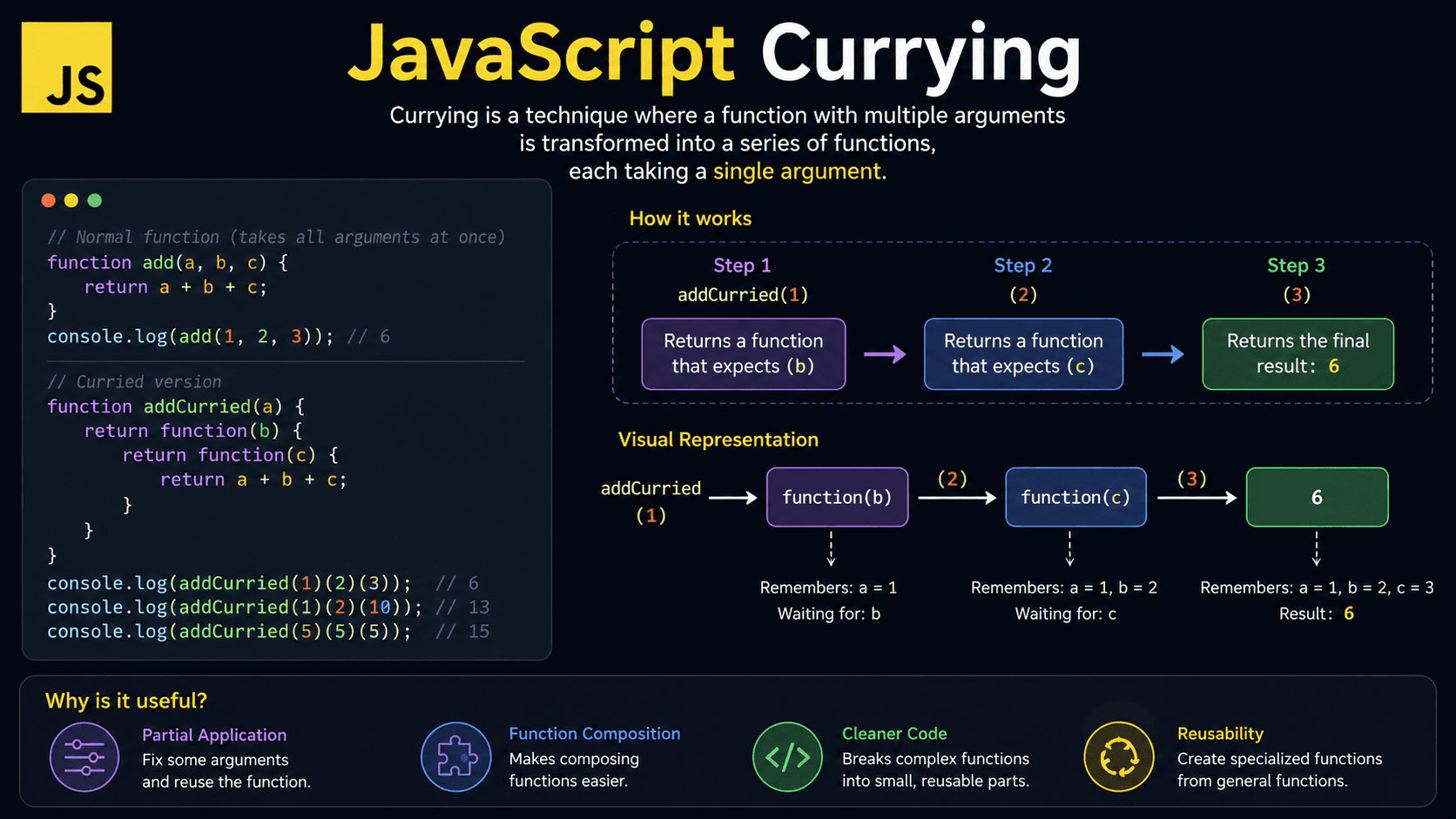
Have you ever seen JavaScript code like sum(2)(3) and wondered why a function is called twice? That pattern is JavaScript currying, a technique for transforming a function that takes multiple arguments into a sequence of smaller, focused functions. You'll find it throughout functional programming, utility libraries, validation logic, event handlers, and configuration code.
Currying looks odd at first. Once the pattern clicks, though, it becomes a natural tool for writing flexible, reusable functions.
What You'll Learn About JavaScript Currying
- Why currying exists and what problem it solves
- What currying means in JavaScript
- How curried functions work step by step
- How currying relates to closures and higher-order functions
- Practical currying examples used in real projects
- Common mistakes beginners make with currying
Prerequisites for Understanding Currying
Currying depends on a few JavaScript fundamentals. If these topics feel unfamiliar, review them first — the examples will make much more sense.
You can also test your basics here:
Why Does Currying Exist?
Currying lets you reuse part of a function call while varying only what changes. Without it, you pass the same arguments over and over, even when most of them stay the same across many calls.
For example, an app may format prices using the same currency and locale repeatedly, while only the amount changes. You could keep writing formatPrice("USD", "en-US", amount) everywhere, but that repeats configuration and makes the code harder to update.
Currying solves this by letting you "preload" some arguments and create a more specific function for later use. Library authors lean on this pattern because it enables function composition, cleaner utilities, and more predictable data transformations.
Without currying, the alternatives are wrapper functions, .bind(), repeated arguments, or one-off helper functions.
Mental Model for Currying
Currying is like filling out a form one section at a time.
Imagine ordering a custom sandwich. First, you choose the bread. The sandwich maker remembers that choice. Then you choose the filling. They remember that too. Finally, you choose the sauce, and only then is the sandwich complete.
Currying works the same way. Instead of giving a function all its information at once, you give it one piece at a time. Each step returns a new function that remembers the earlier choices. When the final piece arrives, JavaScript has everything it needs to produce the result.
So instead of thinking "one function receives many arguments," picture a small chain of functions. Each function collects one value, stores it, and waits for the next.
What Is Currying?
Currying is a functional programming technique where a function with multiple arguments is transformed into a sequence of functions, each taking one argument. In JavaScript, currying works through closures, allowing each returned function to remember previous arguments until all required values are provided.
Currying Explained for Beginners
Currying means breaking a multi-argument function into smaller one-argument functions. Each function accepts one value and returns another function until all values are collected.
Here's the simplest example:
function add(a) {
  return function (b) {
    return a + b;
  };
}

console.log(add(2)(3)); // 5
The first call, add(2), doesn't return the final answer. It returns a new function that remembers a = 2. When you follow up with (3), JavaScript has everything it needs to return 5.
The same pattern written with arrow functions looks like this:
const add = (a) => (b) => a + b;

console.log(add(10)(5)); // 15If you see a function call like fn(a)(b)(c), you are probably looking at currying.
Real-Life Analogy for Currying
Think of currying like placing a coffee order.
First, you choose the size: medium. Then you choose the drink: latte. Then you choose the milk: oat milk.
Each step narrows the order until the final coffee can be made. Currying does the same with function arguments — each call supplies one piece and returns a new function waiting for the next.
How Does JavaScript Currying Work?
JavaScript currying works by returning a new function after each argument is received. Each returned function keeps access to earlier arguments through closures. When the final argument is provided, the innermost function uses all the collected values and returns the result.
Call the first function
The first function receives the first argument and creates a local variable for it.
Return another function
Instead of calculating immediately, it returns a new function that waits for the next argument.
Remember previous values
The returned function keeps access to earlier arguments through JavaScript's lexical scope.
Finish when all arguments arrive
Once the last function receives its value, it calculates and returns the final result.
Here's the flow visually:
multiply(2)(4)

Step 1: multiply(2)
        returns function waiting for b

Step 2: returnedFunction(4)
        calculates 2 * 4

Result: 8
Think Like the JavaScript Engine
Seeing how the JavaScript engine handles a curried function makes the whole pattern less mysterious. Here's what happens step by step:
-
A function call enters the call stack
When you callmultiply(2), JavaScript creates a new execution context formultiply. -
Arguments are stored in a lexical environment
The valuea = 2is stored in the function's local lexical environment. -
A new inner function is created
JavaScript creates and returns the inner function(b) => a * b. -
The outer function finishes
Normally, local variables disappear after a function finishes. But here, the inner function still referencesa. -
The closure keeps memory alive
Since the returned function needsa, JavaScript keeps that value in memory. -
The second call executes later
When you call(4), JavaScript creates another execution context for the inner function. -
The scope chain finds the earlier value
The inner function looks fora. It doesn't find it locally, so it checks its outer lexical environment and finds2. -
Garbage collection happens when references are gone
Once no code references the returned function, JavaScript can clean up the remembered values.
Currying works because JavaScript functions can form closures. A curried function is both a higher-order function and a closure-based pattern.
Core Technical Concepts Behind Currying
Currying relies on three core JavaScript ideas: functions as values, higher-order functions, and closures. Here's how each one contributes:
| Concept | Role in currying |
|---|---|
| Function as a value | A function can be returned from another function |
| Higher-order function | A function can accept or return another function |
| Closure | A returned function remembers variables from its outer scope |
| Lexical scope | JavaScript decides variable access based on where functions are written |
A normal function accepts multiple arguments at once:
function multiply(a, b) {
  return a * b;
}

console.log(multiply(3, 4)); // 12
A curried version accepts them one at a time:
function multiply(a) {
  return function (b) {
    return a * b;
  };
}

console.log(multiply(3)(4)); // 12
Both return the same result, but the curried version lets you create specialized functions:
const multiplyBy3 = multiply(3);

console.log(multiplyBy3(4)); // 12
console.log(multiplyBy3(10)); // 30
How to Recognize Currying in Real Code
You can spot currying by looking for functions that return other functions, especially when calls are chained like fn(a)(b).
Common signs include:
- Arrow functions written like
(a) => (b) => result - Function calls with multiple parentheses, such as
hasRole("admin")(user) - Utility functions that create specialized helpers
- Validation functions that accept rules first and values later
- Event handler factories in React or frontend code
- Functional libraries such as Ramda or Lodash/fp
Real-world examples include permission checks, logging helpers, API request builders, formatting utilities, and reusable filter functions.
JavaScript Currying Examples
Seeing currying in action makes the pattern stick. Here's how it improves common everyday code.
Beginner Example: Adding Two Numbers
const add = (a) => (b) => a + b;

console.log(add(2)(3)); // 5

const addTen = add(10);

console.log(addTen(5)); // 15
console.log(addTen(20)); // 30
addTen is a reusable function created once from add(10) — no need to pass 10 on every call.
Practical Example: Reusable Logger
Currying shines when one value stays constant and another changes.
const createLogger = (level) => (message) => {
  console.log(`[${level.toUpperCase()}] ${message}`);
};

const logError = createLogger("error");
const logInfo = createLogger("info");

logError("Payment failed"); // [ERROR] Payment failed
logInfo("User signed in"); // [INFO] User signed in
Instead of passing "error" on every call, you create a dedicated logError function once and reuse it throughout your app.
Practical Example: Filtering Products
Currying pairs naturally with array methods like filter.
const hasCategory = (category) => (product) => product.category === category;

const products = [
  { name: "Keyboard", category: "electronics" },
  { name: "T-shirt", category: "clothing" },
  { name: "Mouse", category: "electronics" }
];

const electronics = products.filter(hasCategory("electronics"));

console.log(electronics);
// [
//   { name: "Keyboard", category: "electronics" },
//   { name: "Mouse", category: "electronics" }
// ]
hasCategory("electronics") returns a predicate that filter can use directly — no wrapper function needed.
Advanced Example: Generic Curry Helper
You can write a helper that converts any multi-argument function into a curried one.
function curry(fn) {
  return function curried(...args) {
    if (args.length >= fn.length) {
      return fn(...args);
    }

    return function (...nextArgs) {
      return curried(...args, ...nextArgs);
    };
  };
}

const formatPrice = curry((currency, locale, amount) => {
  return new Intl.NumberFormat(locale, {
    style: "currency",
    currency
  }).format(amount);
});

const formatUsd = formatPrice("USD")("en-US");

console.log(formatUsd(25)); // $25.00
console.log(formatUsd(99.99)); // $99.99
The helper checks how many arguments the original function expects via fn.length. Once enough have been collected, it calls the original function with all of them.
Generic curry helpers can behave unexpectedly with optional parameters, rest parameters, or functions whose length does not match how you intend to call them.
Common Mistakes in Currying
Currying is powerful, but a few predictable pitfalls trip up beginners.
Mistake 1: Calling a Curried Function Like a Normal Function
A manually curried function expects separate calls. Passing all arguments at once may not work unless your curry helper supports it.
❌ Wrong:
const multiply = (a) => (b) => a * b;

console.log(multiply(2, 3)); // [Function]
JavaScript ignores the second argument because the first function only uses a.
✅ Correct:
const multiply = (a) => (b) => a * b;

console.log(multiply(2)(3)); // 6
Mistake 2: Currying Everything
❌ Wrong:
const getUserName = (user) => () => user.name;

const user = { name: "Ava" };

console.log(getUserName(user)()); // Ava
This adds an extra function call without any real benefit.
✅ Correct:
const getUserName = (user) => user.name;

const user = { name: "Ava" };

console.log(getUserName(user)); // Ava
Use currying when partial reuse or composition genuinely improves the code.
Mistake 3: Confusing Currying with Partial Application
Currying and partial application are related, but they're not the same.
function add(a, b) {
  return a + b;
}

// Partial application with bind
const addFive = add.bind(null, 5);

console.log(addFive(3)); // 8
This is partial application: you pre-filled one argument of a normal function. Currying, by contrast, transforms the function shape itself into chained single-argument functions.
Best Practices for Using Currying
Good currying makes code easier to reuse. Poor currying makes code harder to read.
When to use it: Reach for currying when one or more arguments are reused often — configuration, formatting rules, filters, and permissions are good candidates.
Name things clearly: Use descriptive names like hasRole("admin") or formatWithCurrency("USD") so the returned function is easy to understand on its own.
Watch the nesting: Avoid deeply chained curried functions if your team is new to functional programming. Readability matters more than cleverness.
TypeScript note: Be careful with deeply curried helpers — they can become tricky to type and debug as complexity grows.
Why Use Currying in JavaScript?
Use currying when you want to create reusable functions by fixing some arguments ahead of time. It reduces repeated configuration, improves function composition, and makes callbacks easier to prepare for array methods, event handlers, validation logic, and utility functions.
Common benefits include:
- Less repeated code
- Easier reusable helper functions
- Cleaner function composition
- Better separation between configuration and data
- More expressive callback functions
Currying vs Partial Application
Currying and partial application often get mentioned in the same breath, but they describe different things.
| Feature | Currying | Partial application |
|---|---|---|
| Meaning | Converts a multi-argument function into chained functions | Pre-fills some arguments of a function |
| Call style | fn(a)(b)(c) | partialFn(c) |
| Returns | A sequence of functions | A function with fewer arguments left |
| Common use | Functional composition | Reusing fixed arguments |
| Requires one argument per step | Usually yes | No |
const add = (a) => (b) => a + b;

const addTen = add(10);

console.log(addTen(5)); // 15
Real-World Use Cases for Currying
Currying appears in production code whenever functions need reusable setup.
Validation Rules
const minLength = (length) => (value) => value.length >= length;

const isValidPassword = minLength(8);

console.log(isValidPassword("abc")); // false
console.log(isValidPassword("secure123")); // true
Permission Checks
const hasPermission = (requiredRole) => (user) => {
  return user.roles.includes(requiredRole);
};

const canEdit = hasPermission("editor");

const user = {
  name: "Mia",
  roles: ["viewer", "editor"]
};

console.log(canEdit(user)); // true
API URL Builders
const createEndpoint = (baseUrl) => (resource) => (id) => {
  return `${baseUrl}/${resource}/${id}`;
};

const apiEndpoint = createEndpoint("https://api.example.com");

const userEndpoint = apiEndpoint("users");

console.log(userEndpoint(42)); // https://api.example.com/users/42
React Event Handler Factories
const createClickHandler = (itemId) => (event) => {
  console.log(`Clicked item: ${itemId}`);
  console.log(event.type);
};

// Example usage in React:
// <button onClick={createClickHandler(product.id)}>View</button>
This pattern lets you pass extra data into an event handler without invoking the final handler immediately.
JavaScript Currying Interview Questions
Currying FAQ
Related JavaScript Topics and Quizzes
Learn the closure behavior that makes curried functions remember previous arguments.
Understand functions that return or accept other functions, a key idea behind currying.
🔑 Key Takeaways
- Currying turns a multi-argument function into chained single-argument functions.
- JavaScript currying works through closures and lexical scope.
- Curried functions are useful when some arguments are reused often.
fn(a)(b)is a common sign that currying is being used.- Currying is related to partial application, but they are not identical.
- Avoid currying when it makes simple code harder to read.
Currying is not something you need for every function, but it is a helpful pattern for reusable utilities, configuration-heavy logic, validation, formatting, and functional programming.
Test Your Currying Knowledge
Reading about currying is a good start, but the concept becomes much clearer when you practice predicting outputs and spotting mistakes.