JavaScript Functions Explained: Syntax and Examples
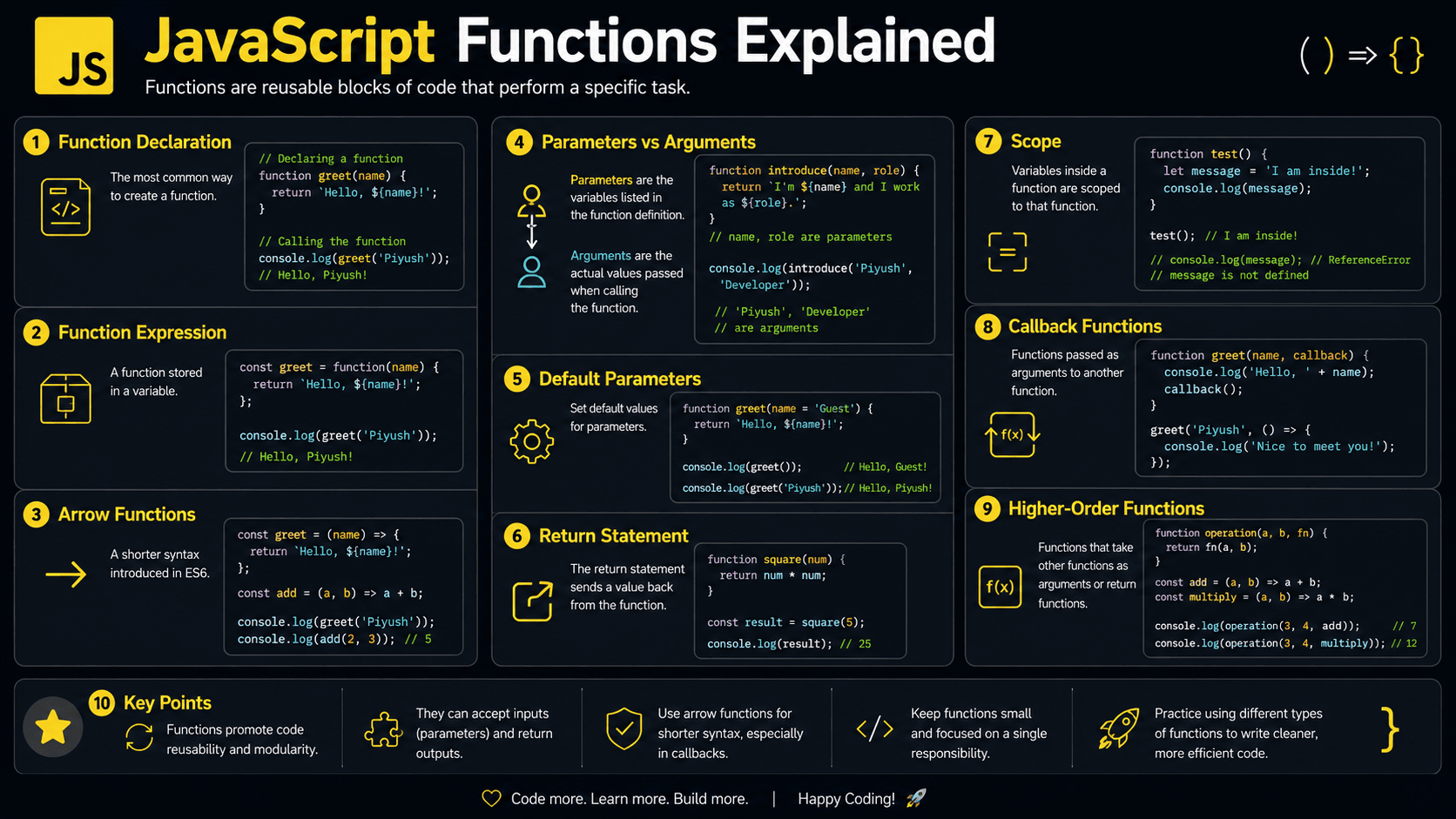
How do developers avoid rewriting the same logic all over an application? They reach for JavaScript functions — a way to group instructions into reusable, named units.
Functions power almost everything you build: button clicks, form validation, API requests, calculations. Once you're comfortable defining, calling, and returning values from them, large JavaScript programs stop feeling tangled and start feeling organized.
What You Will Learn About JavaScript Functions
This guide explains how functions work, why JavaScript needs them, and how to use them safely in real applications.
- Why JavaScript functions exist
- How to declare and call a function
- How parameters, arguments, and return values work
- The differences between function declarations, expressions, and arrow functions
- What happens inside the JavaScript engine
- Common function mistakes and best practices
Prerequisites for Learning Functions
A little familiarity with variables and scope goes a long way here — function syntax leans on both.
You can also test your foundation here:
Why Do JavaScript Functions Exist?
Functions package instructions into reusable units. They cut down on duplicated code, make programs easier to follow, and let you run the same task with different inputs. Without them, every calculation, validation rule, or user interaction would have to be rewritten wherever you needed it.
Picture an online store that calculates a discounted price in five different places. With no function, you copy the discount formula five times. When the rule changes, you have to hunt down and update all five copies.
A function fixes this by keeping the formula in one place. Every other part of the app calls it whenever it needs the result. That's the whole point of functions: reuse, organization, abstraction, and small pieces of logic you can test on their own.
A Simple Mental Model for Functions
Functions are easier to understand when you picture them as small machines that perform specific jobs.
Imagine a kitchen appliance with an input slot, a set of hidden instructions, and an output tray. You place ingredients into the appliance, it follows its instructions, and it produces a result.
A function behaves in a similar way. Its parameters describe the inputs it can receive. Its body contains the instructions to run. A return statement sends a result back to the code that called it.
Some machines do not need input, and some only perform an action without returning anything. JavaScript functions are just as flexible. The important idea is that the caller does not need to repeat or understand every internal step. It only needs to know how to use the function.
Keep this "small machine" picture in mind when you read code: spot the inputs, find the work being done, then check what value comes back out.
A Real-Life Analogy for Reusable Functions
Think of a coffee shop recipe. A barista does not invent a latte from scratch for each customer. The recipe defines the steps, while the requested size and milk type provide the changing inputs.
The recipe is the function, the customer choices are arguments, and the finished drink is the returned result.
How to Recognize Functions in Real JavaScript Code
Functions show up in a lot of shapes: named declarations, values assigned to variables, arrow syntax, object methods, callbacks, and class methods. Once you know the patterns, they're easy to spot.
Keep an eye out for these:
- The
functionkeyword - Arrow syntax such as
(price) => price * 0.9 - Parentheses after a name, such as
calculateTotal() - Functions passed to
map,filter,setTimeout, or event listeners - Methods inside objects, classes, React components, and Node.js modules
- Functions returned from other functions
Production applications use functions for validation, data transformation, event handling, API requests, authorization checks, calculations, and reusable business rules.
What Are JavaScript Functions?
A JavaScript function is a reusable block of code that performs a task. It can accept values called parameters, run its statements when invoked, and return a result. Functions are also first-class values, which means you can assign them to variables, pass them to other functions, and return them from functions.
Here's a small example:
function greetUser(name) {
  return `Hello, ${name}!`;
}

const message = greetUser('Maya');

console.log(message); // Hello, Maya!
You define the function once, then call it with the argument "Maya" whenever you need a greeting.
How Do JavaScript Functions Work?
Under the hood, a function is a callable value that holds both its code and a reference to the scope it was created in. When you invoke it, JavaScript spins up an execution context, matches arguments to parameters, runs the body, and returns a value. Once that's done, the execution context is popped off the call stack.
Define the function
JavaScript creates a callable function value and associates it with its surrounding lexical environment.
Call the function
Parentheses invoke the function. Values inside the parentheses become its arguments.
Create local variables
Parameters and variables declared inside the function become part of its local environment.
Execute the body
JavaScript runs the statements in the function from top to bottom unless control flow changes the order.
Return control
A return statement sends a value to the caller and stops the function. Without one, the result is undefined.
function multiply(firstNumber, secondNumber) {
  const product = firstNumber * secondNumber;
  return product;
}

const result = multiply(4, 5);

console.log(result); // 20
Here, firstNumber and secondNumber are the parameters — the placeholder names. The values 4 and 5 you pass in are the arguments.
Think Like the JavaScript Engine
When a function runs, the JavaScript engine manages its execution context, call stack, lexical environment, and memory.
- Function creation: The engine creates a function object and remembers where the function was defined.
- Invocation: Calling the function creates a new execution context.
- Call stack entry: The new context is pushed onto the call stack.
- Parameter binding: Arguments are assigned to the function's parameters.
- Lexical environment creation: Local variables and declarations become available inside the function.
- Scope-chain lookup: If a variable is not local, JavaScript searches the surrounding lexical environments.
- Return: The function produces a value or returns
undefined, then its context leaves the stack. - Memory cleanup: Unreachable data may be reclaimed by garbage collection. Data referenced by a closure remains available.
Consider nested calls:
function addTax(price) {
  return price * 1.2;
}

function formatPrice(price) {
  const taxedPrice = addTax(price);
  return `$${taxedPrice.toFixed(2)}`;
}

console.log(formatPrice(50)); // $60.00
formatPrice enters the stack first. When it calls addTax, a second context stacks on top of it. addTax runs, returns, and leaves the stack — only then does formatPrice pick up where it left off.
The exact memory implementation differs between JavaScript engines. The execution-context and call-stack model is a practical way to understand observable behavior.
Function Declarations, Expressions, and Arrow Functions
JavaScript gives you several ways to create a function. They look similar, but they don't behave the same way in every situation — and those differences trip up a lot of beginners.
| Function type | Syntax | Hoisted for early calls? | Own this value? |
|---|---|---|---|
| Declaration | function load() {} | Yes | Yes |
| Expression | const load = function () {}; | No | Yes |
| Arrow function | const load = () => {}; | No | No |
Function declarations
A declaration is useful for named, reusable operations.
function calculateArea(width, height) {
  return width * height;
}

console.log(calculateArea(6, 4)); // 24
You can call a declaration earlier in its scope than where you wrote it, because JavaScript processes declarations before it runs any statements. This is called hoisting.
Function expressions
A function expression stores a function in a variable.
const calculateArea = function (width, height) {
  return width * height;
};

console.log(calculateArea(6, 4)); // 24
Unlike a declaration, you can't use this function before the variable has been initialized.
Arrow functions
Arrow functions offer compact syntax and are common in callbacks.
const calculateArea = (width, height) => width * height;

console.log(calculateArea(6, 4)); // 24Use concise arrow functions for short callbacks. Prefer named declarations or expressions when a descriptive name makes complex logic easier to debug.
Parameters, Arguments, and Return Values
The distinction is small but worth nailing down: parameters are the names listed in a function definition, while arguments are the actual values you pass when you call it.
function createLabel(productName, price = 0) {
  return `${productName}: $${price.toFixed(2)}`;
}

console.log(createLabel('Notebook', 8.5)); // Notebook: $8.50
console.log(createLabel('Sample')); // Sample: $0.00
The default value keeps price from being undefined when the caller skips the second argument.
When a function needs to handle an unknown number of arguments, reach for rest parameters:
function calculateTotal(...prices) {
  return prices.reduce((total, price) => total + price, 0);
}

console.log(calculateTotal(10, 15, 5)); // 30
And remember: a function stops the moment it hits return, so anything after it never runs:
function getAccessMessage(isLoggedIn) {
  if (!isLoggedIn) {
    return 'Please sign in';
  }

  return 'Welcome back';
}

console.log(getAccessMessage(false)); // Please sign in
Functions as First-Class Values
JavaScript treats functions like any other value. You can store a function, pass it as an argument, or return it from another function.
When a function takes another function as input or hands one back, we call it a higher-order function.
function applyDiscount(price, discountRule) {
  return discountRule(price);
}

function studentDiscount(price) {
  return price * 0.85;
}

const finalPrice = applyDiscount(100, studentDiscount);

console.log(finalPrice); // 85
Notice that studentDiscount is passed without parentheses. You're handing over the function itself as an argument, not calling it on the spot. This distinction matters, and it's the same one behind a common bug you'll see later with callbacks.
Functions can preserve private state
A returned function can hold on to variables from its outer scope, even after that outer function has finished running. This behavior is known as a closure.
function createCounter() {
  let count = 0;

  return function increment() {
    count += 1;
    return count;
  };
}

const nextCount = createCounter();

console.log(nextCount()); // 1
console.log(nextCount()); // 2
The increment function keeps its grip on count even after createCounter has returned, so each call picks up where the last one left off.
Practical JavaScript Function Example
Functions let you split business rules into small, focused operations. Here's a shopping-cart example that calculates a subtotal and then applies a discount to it.
function calculateSubtotal(items) {
  return items.reduce((total, item) => {
    return total + item.price * item.quantity;
  }, 0);
}

function applyDiscount(amount, discountPercent) {
  const discount = amount * (discountPercent / 100);
  return amount - discount;
}

const cartItems = [
  { name: 'Keyboard', price: 50, quantity: 1 },
  { name: 'Mouse', price: 25, quantity: 2 },
];

const subtotal = calculateSubtotal(cartItems);
const discountedTotal = applyDiscount(subtotal, 10);

console.log(subtotal); // 100
console.log(discountedTotal); // 90
Each function owns one clear responsibility, which makes the code easy to test in isolation and simple to change later.
Common Mistakes in JavaScript Functions
Most function bugs trace back to a handful of habits: forgetting to return a value, confusing a function with its result, or reaching for an arrow function where a dynamic this is needed. Here's how to spot each one.
Forgetting to return a value
A function without an explicit return statement produces undefined, even
if it calculates the correct value internally.
❌ Wrong
function add(firstNumber, secondNumber) {
  const total = firstNumber + secondNumber;
}

console.log(add(2, 3)); // undefined
✅ Correct
function add(firstNumber, secondNumber) {
  return firstNumber + secondNumber;
}

console.log(add(2, 3)); // 5
Calling a callback too early
❌ Wrong
function showMessage() {
  console.log('Finished');
}

setTimeout(showMessage(), 1000);
Because of the parentheses, showMessage() runs right away and its return value (here, undefined) is what gets handed to setTimeout.
✅ Correct
function showMessage() {
  console.log('Finished');
}

setTimeout(showMessage, 1000); // Finished after about one second
Returning an object from an arrow function incorrectly
Braces after an arrow normally start a function body. Wrap an object literal in parentheses when using an implicit return.
❌ Wrong
const createUser = (name) => {
  name: name;
};

console.log(createUser('Ava')); // undefined
✅ Correct
const createUser = (name) => ({ name: name });

console.log(createUser('Ava')); // { name: "Ava" }
Using an arrow function as an object method
Arrow functions do not create their own this.
❌ Wrong
const account = {
  owner: 'Noah',
  getOwner: () => this.owner,
};

console.log(account.getOwner()); // Usually undefined
✅ Correct
const account = {
  owner: 'Noah',
  getOwner() {
    return this.owner;
  },
};

console.log(account.getOwner()); // Noah
JavaScript Function Best Practices
Good functions share a few traits: they stay focused, behave predictably, and carry a name that tells you exactly what they do.
Name for the action: Use action-oriented names such as calculateTotal, validateEmail, or fetchProducts, and steer clear of vague ones like doThing.
Keep it single-purpose: Give each function one responsibility. Smaller functions are easier to test, reuse, and review.
Additional practical guidelines include:
- Prefer
constfor function expressions that should not be reassigned. - Return values instead of relying on shared global variables.
- Use default parameters when an input has a sensible fallback.
- Validate inputs at application boundaries.
- Avoid deeply nested conditions by returning early.
- Use comments to explain why code exists, not to restate obvious syntax.
- Choose regular functions when you need a dynamic
thisvalue.
Real-World Uses of JavaScript Functions
Functions appear in almost every part of a JavaScript application:
- Event handlers: Respond to clicks, form submissions, and keyboard input.
- Validation: Check emails, passwords, dates, and user-submitted values.
- Data transformation: Convert API responses into formats needed by the interface.
- Array processing: Supply callbacks to
map,filter,find, andreduce. - API communication: Group request, error-handling, and response logic.
- React development: Define components, hooks, event handlers, and state updaters.
- Node.js applications: Handle requests, middleware, database queries, and file operations.
- Timers and asynchronous work: Run callbacks after tasks or delays complete, scheduled by the event loop.
JavaScript Function Interview Questions
Frequently Asked Questions About JavaScript Functions
Related JavaScript Learning Resources
Learn how local, global, block, and lexical scope control variable access.
Compare arrow functions with traditional function syntax and dynamic this.
Understand how functions are passed to event handlers, timers, and array methods.
🔑 Key Takeaways
- JavaScript functions group reusable instructions into callable values.
- Parameters define expected inputs, while arguments provide actual values.
- A function returns
undefinedunless it reaches areturnstatement. - Declarations, expressions, and arrow functions have different syntax and behavior.
- Functions can be passed to other functions and returned as results.
- Focused names and single-purpose functions make applications easier to maintain.
Test Your Knowledge of JavaScript Functions
You've now seen how functions are defined, executed, passed around as values, and put to work in real applications. The best way to lock it in is to test whether you can predict their behavior in practical code.