JavaScript Closures: How Functions Remember Their Scope
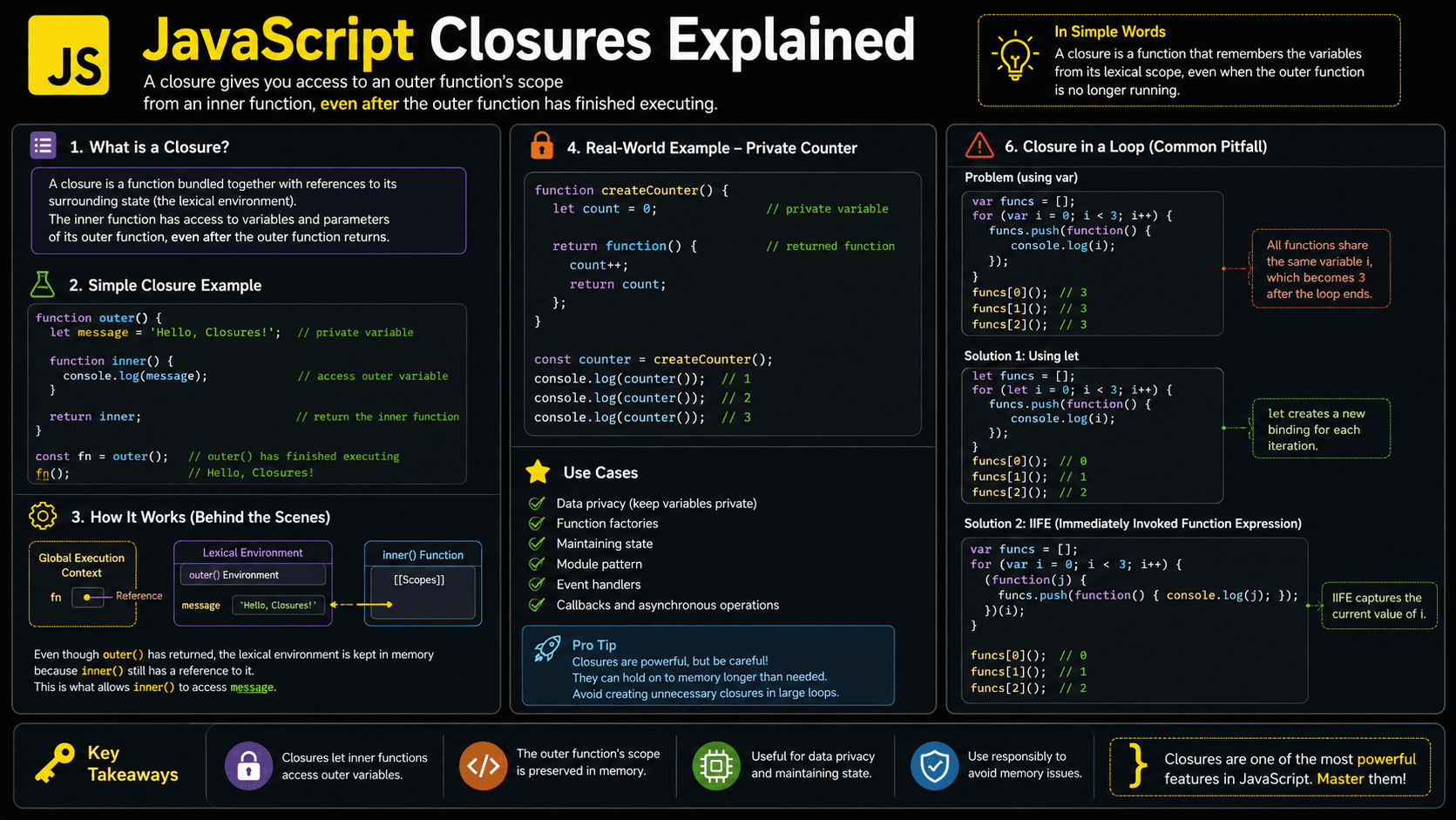
Ever wondered how a JavaScript function can still remember a variable after its outer function has already finished running? That's a closure at work. Closures let a function hold on to the variables around it, which is what powers private state, event handlers, callbacks, memoization, and a lot of the patterns you already use every day.
Here's the idea in three lines:
function createGreeting(name) {
  return () => `Hello, ${name}!`;
}

const greet = createGreeting('Maya');
console.log(greet()); // Hello, Maya! — name is still remembered
createGreeting has already returned, yet the function it handed back still reaches name. That memory is the closure.
They feel mysterious the first time you meet them. But once you connect closures to lexical scope and walk through a few examples, they turn into something predictable, just another part of how functions behave.
What You'll Learn About JavaScript Closures
We'll start with a simple mental model and build up to the patterns you'll see in real production code.
- Why closures exist in JavaScript
- How closures retain access to lexical scope
- What the JavaScript engine does behind the scenes
- How to create private state with closures
- Where closures appear in real applications
- Which closure mistakes can cause bugs or memory issues
Prerequisites for Understanding Closures
Closures build directly on functions and lexical scope. If either feels shaky, a quick refresher will make everything here click faster.
- JavaScript Scope and Variable Visibility
- JavaScript Lexical Environment
- Higher-Order Functions in JavaScript
You can also test your basics here:
Why Do JavaScript Closures Exist?
Functions often need to remember data between calls, and dumping that data into global variables is a bad habit. Closures give a function a way to keep access to the environment it was born in, so it can hold state privately instead of leaking it everywhere.
Without closures, you'd be stuck stashing temporary state globally, threading the same values through call after call, or spinning up objects whose only job is to hold data. Each of those exposes internals you'd rather hide and makes the code harder to maintain.
Closures fix this by tying behavior to the exact variables that behavior depends on. That single idea is what makes callbacks, function factories, event handlers, partial application, private state, and module patterns possible. And closures aren't a bolted-on feature, they fall out naturally from JavaScript's lexical scoping rules and first-class functions.
A Mental Model for JavaScript Closures
Closures click faster if you picture every function carrying a small backpack.
When JavaScript creates a function, imagine it hands the function a backpack. Inside are references to the variables that were in reach where the function was created.
That function can go anywhere, get returned from another function, or sit around and run much later. The backpack goes with it. Whenever the function needs an outer variable, it reaches into that remembered environment.
Here's the key detail: the backpack doesn't hold frozen snapshots of each value. It holds live access to the variables themselves, and those can change over time. That's exactly why several functions can share and update the same private state.
The technical name for that backpack-like connection is a lexical environment. The combination of a function and access to its surrounding lexical environment forms a closure.
A Real-Life Closure Analogy
Picture a secure storage locker and its key. A staff member hands you a key, then clocks out for the day. They're long gone, but the key still opens the one locker it was cut for.
The returned function is that key. The outer function builds the locker, and the variables inside are its private contents. Only a function holding the right key can read or change what's stored there.
What Are JavaScript Closures?
A JavaScript closure is a function bundled together with references to variables from the lexical scope where it was created. The function keeps access to those variables even after the outer function has returned. That's what enables persistent private state, function factories, callbacks, event handlers, and a long list of other JavaScript patterns.
Here's a small example:
function createGreeting(name) {
  return function greet() {
    return `Hello, ${name}!`;
  };
}

const greetMaya = createGreeting('Maya');

console.log(greetMaya()); // Hello, Maya!
createGreeting() has already finished by the time greetMaya() runs, yet the returned greet function still reaches name without any trouble.
Rule of thumb: If an inner function uses a variable declared in an outer function, that inner function forms a closure over the variable.
How Do Closures Work in JavaScript?
Closures work because a function keeps access to its lexical environment even after leaving the scope where it was created. When the function later reads an outer variable, JavaScript walks the function's scope chain until it finds the matching binding in that preserved environment.
Call the outer function
JavaScript creates a new execution context and local lexical environment for the outer function.
Create the inner function
The inner function is created with a reference to the surrounding lexical environment.
Return or store the function
The inner function may be returned, assigned to a variable, or passed as a callback.
Finish the outer call
The outer function leaves the call stack, but its required variables remain reachable through the inner function.
Execute the closure later
The inner function follows its scope chain and accesses the preserved outer variables.
A counter makes this concrete:
function createCounter() {
  let count = 0;

  return function increment() {
    count += 1;
    return count;
  };
}

const counter = createCounter();

console.log(counter()); // 1
console.log(counter()); // 2
console.log(counter()); // 3
Every call bumps the same count binding. It never resets, because counter keeps its outer lexical environment reachable.
Think Like the JavaScript Engine
Under the hood, closures pull together execution contexts, lexical environments, the scope chain, and memory management. Here's the sequence the engine runs through:
- Global execution begins: JavaScript creates the global execution context and places it on the call stack.
- The outer function runs: Calling
createCounter()adds a function execution context to the stack. - Local bindings are created: The function's lexical environment stores the
countbinding. - The inner function is created:
incrementreceives an internal connection to its surrounding lexical environment. - The outer call returns: The
createCounter()execution context is removed from the call stack. - Required data remains reachable: The lexical environment containing
countcannot be discarded becausecounterstill references it. - The closure runs: JavaScript checks the closure's local scope, then follows its scope chain to find
count. - Garbage collection happens later: When the closure is no longer reachable, its retained environment can be garbage-collected.
counter function
       |
       v
preserved lexical environment
       |
+-- count: 3Closures do not keep an entire finished execution context running on the call stack. They retain access to the lexical bindings needed by reachable functions.
Closures Capture Bindings, Not Frozen Values
A closure reads the current value of a captured variable, not a snapshot taken when the function was created.
function createStatusReader() {
  let status = 'pending';

  return {
    readStatus() {
      return status;
    },
    complete() {
      status = 'complete';
    },
  };
}

const task = createStatusReader();

console.log(task.readStatus()); // pending
task.complete();
console.log(task.readStatus()); // complete
Both methods close over the same status binding, so when one changes it, the other immediately sees the new value.
Call the outer function again, though, and you get a completely separate environment:
const firstCounter = createCounter();
const secondCounter = createCounter();

console.log(firstCounter()); // 1
console.log(firstCounter()); // 2
console.log(secondCounter()); // 1
The two counters never step on each other, because each createCounter() call mints its own count binding.
Practical Closure Examples
Closures earn their keep whenever some behavior needs to remember data between calls.
Creating Private State
balance is never exposed directly here. The only way to touch it is through the methods the function hands back.
function createBankAccount(initialBalance) {
  let balance = initialBalance;

  return {
    deposit(amount) {
      if (amount <= 0) {
        throw new Error('Deposit must be positive');
      }

      balance += amount;
      return balance;
    },

    getBalance() {
      return balance;
    },
  };
}

const account = createBankAccount(100);

console.log(account.deposit(50)); // 150
console.log(account.getBalance()); // 150
console.log(account.balance); // undefined
Keep in mind this is privacy through controlled access, not a security boundary. Any code running in the same application can still call the methods you exposed.
Configuring Reusable Functions
A function factory leans on closures to stamp out functions that already carry their configuration.
function createPriceFormatter(currency, locale) {
  const formatter = new Intl.NumberFormat(locale, {
    style: 'currency',
    currency,
  });

  return function formatPrice(amount) {
    return formatter.format(amount);
  };
}

const formatUSD = createPriceFormatter('USD', 'en-US');
const formatEUR = createPriceFormatter('EUR', 'de-DE');

console.log(formatUSD(29.99)); // $29.99
console.log(formatEUR(29.99)); // 29,99 €
Each returned function hangs on to its own formatter.
Memoizing Expensive Results
Memoization caches results so the same input never triggers the same work twice.
function memoizeSquare() {
  const cache = new Map();

  return function square(number) {
    if (cache.has(number)) {
      return cache.get(number);
    }

    const result = number * number;
    cache.set(number, result);
    return result;
  };
}

const square = memoizeSquare();

console.log(square(12)); // 144
console.log(square(12)); // 144, returned from cache
That private cache sticks around for as long as square itself is reachable.
How to Recognize Closures in Real Code
There's no closure keyword to grep for. Instead, watch for a function that reaches for variables declared outside its own body, especially when that function gets stored somewhere or runs later.
A few telltale signs:
- A function returning another function
- Event handlers using values from surrounding code
- Callbacks passed to timers or array methods
- Factory functions that remember configuration
- Module patterns with private variables
- Memoization caches
- React event handlers and effects
- Functions that share private state
function attachButtonHandler(button, message) {
  button.addEventListener('click', () => {
    console.log(message);
  });
}
The arrow function closes over message, so it can reach that value every time the button is clicked, long after attachButtonHandler has returned.
React function components create new closures during each render. Event handlers and effects can therefore observe values from the render in which they were created.
Common Closure Mistakes Developers Make
Most closure bugs trace back to the same handful of misunderstandings: shared bindings, loop scope, stale values, or memory that never gets released.
Using var in an Asynchronous Loop
Common mistake: var creates one function-scoped binding. Every callback
in the loop closes over that same binding.
❌ Wrong: callbacks share one i
for (var i = 0; i < 3; i += 1) {
  setTimeout(() => {
    console.log(i);
  }, 0);
}

// Expected by some developers: 0, 1, 2
// Actual output: 3, 3, 3
✅ Correct: let creates a binding for each iteration
for (let i = 0; i < 3; i += 1) {
  setTimeout(() => {
    console.log(i);
  }, 0);
}

// Output: 0, 1, 2
Accidentally Sharing One Closure
If every caller receives the same returned function, they all share a single counter, whether you meant them to or not.
❌ Wrong for independent counters
const sharedCounter = createCounter();

const counterA = sharedCounter;
const counterB = sharedCounter;

console.log(counterA()); // 1
console.log(counterB()); // 2
✅ Correct: create separate environments
const counterA = createCounter();
const counterB = createCounter();

console.log(counterA()); // 1
console.log(counterB()); // 1
Retaining Unneeded Data
A reachable closure can keep captured data in memory. Long-lived event listeners, timers, and caches deserve special attention when they reference large objects.
The fix is to remove listeners and clear caches once you're done with them:
function registerHandler(button, largeDataset) {
  function handleClick() {
    console.log(largeDataset.length);
  }

  button.addEventListener('click', handleClick);

  return function cleanup() {
    button.removeEventListener('click', handleClick);
  };
}
Closure Best Practices
Good closure design comes down to keeping captured state small, intentional, and easy to reason about.
Capture only what you need: Reach for the small primitive or identifier instead of holding a reference to a large outer object.
Prefer const and let over var: Their block scoping heads off a whole class of closure-in-a-loop bugs.
Name your returned functions when the behavior isn't obvious: Descriptive names show up in stack traces and make closure-heavy code far easier to maintain.
Additional practices include:
- Provide cleanup functions for event listeners and subscriptions.
- Add cache limits when memoization may receive unlimited inputs.
- Avoid hiding too much mutable state inside deeply nested functions.
- Prefer a class or plain object when it communicates the design more clearly.
- Test multiple instances to confirm whether state should be shared or isolated.
Closures vs Classes for Private State
Closures and classes can both hold onto state. The difference is in how they organize it.
| Concern | Closure | Class |
|---|---|---|
| State location | Lexical environment | Object instance |
| Privacy | State omitted from returned API | Private fields use # |
| Typical use | Small factories and callbacks | Structured object models |
| Methods | Often created per factory call | Usually shared through the prototype |
| Best choice | Compact, function-focused behavior | Many related methods or instances |
Neither one wins outright. Pick whichever makes ownership, state changes, and cleanup easiest to follow in your specific case.
Real-World Uses of JavaScript Closures
Once you know what to look for, you'll spot closures all over production JavaScript:
- Event handlers: Remember component IDs, configuration, or application state.
- Timers and asynchronous callbacks: Preserve values until the event loop runs the work later.
- Factory functions: Produce customized validators, formatters, or request handlers.
- Private state: Restrict updates to a small public API.
- Memoization: Retain cached results between calls.
- Currying and partial application: Preconfigure some arguments for later use.
- Modules: Keep implementation details outside the public interface.
- React code: Event handlers, effects, and callback hooks capture render-specific values.
They don't always announce themselves. Any time a callback reads something from the scope around it, a closure is quietly doing the work.
JavaScript Closure Interview Questions
These come up often, and they test whether you understand both the definition and the runtime behavior behind it.
Frequently Asked Questions About Closures
A few more questions that tend to come up while closures are still settling in.
Related JavaScript Topics and Quizzes
Keep going with the concepts that closure-heavy code leans on most.
🔑 Key Takeaways
At their core, closures link a function to the lexical environment it was created in.
- A closure retains access to outer lexical bindings.
- The outer function may finish while its captured variables remain reachable.
- Closures support private state, callbacks, factories, and memoization.
- Each outer function call can create an independent closure environment.
- Closures capture bindings rather than frozen copies of values.
- Use
letin loops and clean up long-lived listeners, timers, and caches.
Test Your JavaScript Closure Knowledge
You now know why closures exist, how the scope chain resolves captured variables, and where the bugs tend to hide. The best way to lock it in is to read real code and predict what it prints before you run it.