JavaScript Callback Functions: A Complete Beginner’s Guide
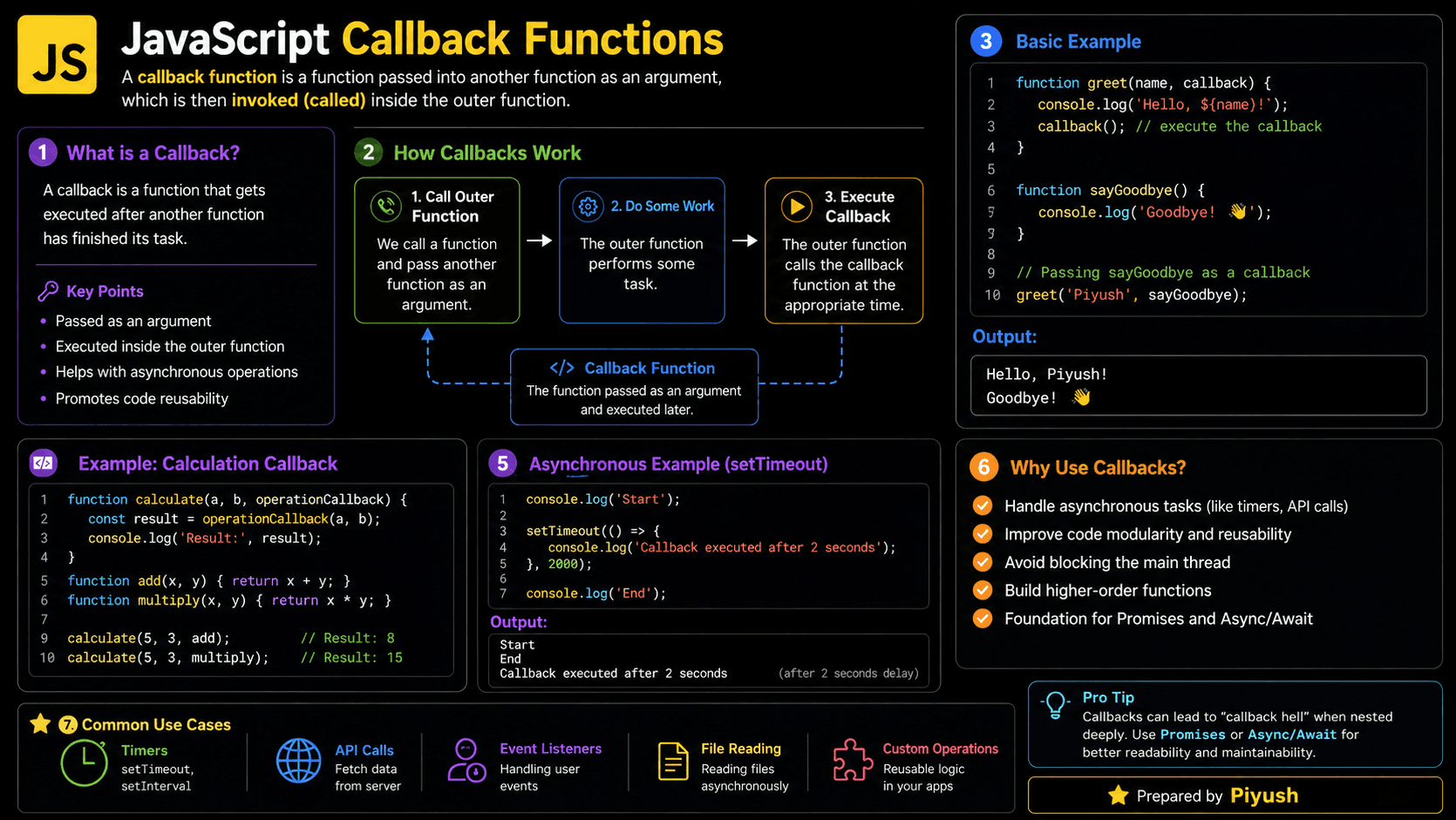
Have you ever needed JavaScript to run some code after a user clicks a button, a timer finishes, or data arrives from a server? JavaScript callback functions make this possible by letting one function decide when another function should run.
You'll find callbacks everywhere in JavaScript: array methods like map(), browser events, timers, and older asynchronous APIs. Get comfortable with them, and promises, async/await, and event-driven programming become much easier to pick up.
You've probably already used one without realizing it:
setTimeout(() => {
  console.log('Two seconds passed!');
}, 2000);
The arrow function here is a callback — you hand it to setTimeout(), and JavaScript calls it back after the delay.
What You’ll Learn About Callback Functions
By the end of this guide, you'll be able to read, write, and debug callbacks with confidence. Here's what we'll cover:
- Why callback functions exist
- How to pass a function as an argument
- The difference between synchronous and asynchronous callbacks
- How the call stack and event loop process callbacks
- Common callback mistakes and best practices
- Where callbacks appear in production applications
Prerequisites for Learning JavaScript Callbacks
Before you start, a quick refresher on functions and the event loop will make everything here easier to follow:
You can also test your foundations:
Why Do Callback Functions Exist?
Callbacks exist because reusable operations often need customizable behavior. Instead of hard-coding what happens during or after an operation, you pass in a function that the operation calls at the right time. Your code stays flexible, and JavaScript can respond to events or finished work.
Think about what the alternative looks like. Without callbacks, you'd need a separate version of the same function for every possible action: a sorting utility with one implementation for ascending order and another for descending, or an event system that somehow knows every action a click could trigger.
Callbacks solve this through composition. One function performs the main operation, and another supplies the variable behavior. This matters even more in JavaScript because the browser is event-driven — user input, timers, network responses, and file operations don't always finish immediately.
A Beginner-Friendly Mental Model for Callbacks
So how do you picture this in your head? Think of a callback as a set of instructions you hand to someone else, who uses them at the right moment.
Imagine leaving your phone number at a repair shop. You don't stand beside the technician waiting for the repair to finish. You go on with your day and ask the shop to call you when the work is done.
Your phone number and the instruction to call represent the callback. The repair shop controls when that callback is used.
Not every callback involves waiting, though. You could also hand a chef instructions for how to season each dish as they cook. In both cases, one operation receives another action and decides when to perform it.
The key idea is control. You provide the function, but the receiving function or API decides when to invoke it.
A Real-Life Callback Analogy
Here's an even simpler version. You order coffee and say, “Text me when my order is ready.” Preparing the drink is the main task; sending the text is the callback.
You provide the action in advance, and the café performs it later. In JavaScript, a timer, event listener, or data-loading function plays the café’s role.
What Is a Callback Function in JavaScript?
With the analogies in place, here's the formal definition. A callback function is a function passed as an argument to another function and invoked by that function at a chosen time. Callbacks let you customize behavior, respond to events, process values, or continue work after an asynchronous operation completes. They may run immediately or later.
One more term you'll see constantly: a function that accepts or returns another function is called a higher-order function.
function greetUser(name, formatGreeting) {
  return formatGreeting(name);
}

function createFriendlyGreeting(name) {
  return `Hello, ${name}!`;
}

console.log(greetUser('Maya', createFriendlyGreeting));
// Expected output: Hello, Maya!
Notice that createFriendlyGreeting is passed without parentheses. That detail matters: it gives greetUser the function itself rather than its result.
Memorable rule: Pass myFunction when another function should call it.
Use myFunction() when you want to call it now.
How Do Callback Functions Work in JavaScript?
Now that you know what a callback is, let's trace how one actually moves through your code. A callback is passed as a value, stored in a parameter, and invoked when the receiving function reaches the right point. This works because JavaScript functions are first-class values: they can be assigned to variables, placed in objects, returned from functions, and passed as arguments.
Define the callback
Create a named function or function expression containing the behavior you want to supply.
Pass the function
Give the function reference to a higher-order function, such as an array method or event API.
Store it in a parameter
The receiving function accesses the callback through one of its parameters.
Invoke it when needed
The receiving function calls the callback and may pass values into it.
Use the result
For synchronous callbacks, the receiving function can use or return the callback’s result.
The basic flow looks like this:
Create callback
      ↓
Pass callback to another function
      ↓
Receiving function performs its work
      ↓
Receiving function invokes callback
      ↓
Callback handles values or continues the task
Think Like the JavaScript Engine
Those five steps describe what your code does. Here's what the engine does underneath. To the JavaScript engine, a callback is just another function value: synchronous callbacks run directly on the call stack, while asynchronous callbacks wait in a queue until the stack is clear.
- Function creation: JavaScript creates the callback function in memory. Its lexical environment connects it to variables available where it was defined.
- Argument passing: The callback’s function reference is passed to another function.
- Execution context: When invoked, the engine creates a new execution context for the callback.
- Call stack: A synchronous callback is pushed onto the stack, executed, and removed before the surrounding function continues.
- Browser API handling: Timers, clicks, and some network activity are handled outside the JavaScript call stack by browser or runtime APIs.
- Task queue: When an asynchronous task is ready, its callback is placed in the appropriate queue.
- Event loop: The event loop moves the queued callback to the call stack once the stack is empty.
- Memory cleanup: Unreachable callback functions and captured values can later be removed by garbage collection.
A callback does not automatically make code asynchronous. Array methods such
as map() invoke callbacks synchronously, while setTimeout() schedules a
callback for later.
Synchronous and Asynchronous Callback Examples
That distinction between "runs now" and "runs later" is worth seeing in real code. Synchronous callbacks finish during the current operation, while asynchronous callbacks run later, usually after an event or external task.
| Callback type | When it runs | Common examples |
|---|---|---|
| Synchronous | Before the current function returns | map(), filter(), sort() |
| Asynchronous | After the current call stack finishes | setTimeout(), event listeners |
| Error-first | After a Node.js-style operation | Legacy file and database APIs |
Processing an Array with a Synchronous Callback
Start with the synchronous case. The callback passed to map() runs once for each array item, and everything finishes before the next line executes.
const prices = [10, 25, 40];

const pricesWithTax = prices.map(function addTax(price) {
  return price * 1.2;
});

console.log(pricesWithTax);
// Expected output: [12, 30, 48]
The same callback can be written as an arrow function:
const prices = [10, 25, 40];
const pricesWithTax = prices.map((price) => price * 1.2);

console.log(pricesWithTax);
// Expected output: [12, 30, 48]
Scheduling an Asynchronous Timer Callback
Now compare that with an asynchronous callback. setTimeout() registers a callback to run after at least the specified delay — and the output order might surprise you at first.
console.log('Start');

setTimeout(() => {
  console.log('Timer finished');
}, 1000);

console.log('End');

// Expected output:
// Start
// End
// Timer finished
End appears before Timer finished because the timer callback can't run until the current call stack is empty. This is the event loop at work.
Responding to a Browser Event
Timers fire once, but events can fire any number of times. Event handlers are callbacks the browser invokes whenever the event occurs.
const saveButton = document.querySelector('#save-button');

saveButton.addEventListener('click', () => {
  console.log('Changes saved');
});

// Expected output after a click:
// Changes saved
The callback may also receive an event object:
saveButton.addEventListener('click', (event) => {
  console.log(`Clicked element: ${event.currentTarget.id}`);
});

// Expected output after a click:
// Clicked element: save-button
Creating a Reusable Callback-Based Operation
So far you've used callbacks that other APIs invoke. You can also build your own higher-order function that accepts callbacks for both successful and failed outcomes.
function divideNumbers(dividend, divisor, onSuccess, onError) {
  if (divisor === 0) {
    onError(new Error('Cannot divide by zero'));
    return;
  }

  onSuccess(dividend / divisor);
}

divideNumbers(
  20,
  4,
  (result) => {
    console.log(`Result: ${result}`);
  },
  (error) => {
    console.error(error.message);
  },
);

// Expected output: Result: 5
Modern asynchronous APIs usually use promises instead of separate success and error callbacks, but this pattern shows you how callback-based control flow works under the hood — and you'll still meet it in older codebases.
How to Recognize Callback Functions in Real Code
Once you know the pattern, you'll start spotting callbacks everywhere. They usually appear as function references, arrow functions, or function expressions supplied as arguments. Look for methods that receive a function and invoke it for each value, event, or completed operation.
Here are the patterns you'll run into most often:
- Array methods:
map(),filter(),find(),reduce(), andforEach() - Event registration:
addEventListener("click", callback) - Timers:
setTimeout(callback, delay) - React event props:
onClick={handleClick} - Express middleware:
app.use((request, response, next) => {}) - Node.js error-first callbacks:
(error, result) => {} - Sorting functions:
items.sort(compareItems) - Test utilities:
beforeEach(callback)andtest(name, callback)
Notice there's no callback keyword anywhere. A function becomes a callback because of how it's passed and invoked, not because of how it's written.
Common Callback Function Mistakes
Knowing where callbacks appear is half the battle; the other half is avoiding the bugs they invite. Most callback bugs come from calling a function too early, misunderstanding returned values, or creating deeply nested control flow.
Calling the Function Instead of Passing It
Common mistake: Adding parentheses invokes the function immediately. APIs expecting a callback usually need the function reference.
function showMessage() {
  console.log('Button clicked');
}

button.addEventListener('click', showMessage());
Here showMessage() runs immediately during registration, and its return value (undefined) is what gets passed as the listener. The click does nothing.
Expecting an Asynchronous Return Value Immediately
An asynchronous callback runs later, so its result cannot be returned synchronously from the surrounding function.
// ❌ Wrong
function getStatus() {
  setTimeout(() => {
    return 'Ready';
  }, 100);

  return undefined;
}

console.log(getStatus());
// Expected output: undefined
The return "Ready" inside the timer callback goes nowhere useful — the outer function returned long before the timer fired. Instead, use the result inside the callback, or return a promise:
// ✅ Correct
function getStatus() {
  return new Promise((resolve) => {
    setTimeout(() => {
      resolve('Ready');
    }, 100);
  });
}

getStatus().then((status) => {
  console.log(status);
});

// Expected output: Ready
Creating Callback Hell
The third trap builds up gradually. Each asynchronous step nests inside the last, and before long, error handling and execution order become hard to follow. Developers call this "callback hell" for a reason.
// ❌ Hard to maintain
getUser(userId, (user) => {
  getOrders(user.id, (orders) => {
    getOrderDetails(orders[0].id, (details) => {
      displayOrder(details);
    });
  });
});
If the APIs support promises, flatten the flow:
// ✅ Easier to read
async function displayFirstOrder(userId) {
  const user = await getUser(userId);
  const orders = await getOrders(user.id);
  const details = await getOrderDetails(orders[0].id);

  displayOrder(details);
}
Callback Function Best Practices
Avoiding those mistakes is a start. Writing callbacks that stay maintainable takes a few habits: good callbacks are focused, clearly named, and explicit about errors and expected arguments.
Use named callbacks when the behavior is complex or reused. Names improve stack traces and make code easier to scan.
- Keep callbacks short and responsible for one task.
- Prefer descriptive names such as
handleSubmitorcomparePrices. - Document the arguments a custom callback receives.
- Handle errors instead of silently ignoring them.
- Avoid unnecessary nesting.
- Use promises or async/await for multi-step asynchronous workflows.
- Remove event listeners when they are no longer needed.
- Do not assume a callback executes only once unless the API guarantees it.
function handleSaveClick() {
  validateForm();
  saveForm();
}

saveButton.addEventListener('click', handleSaveClick);

// Remove it later with the same function reference:
saveButton.removeEventListener('click', handleSaveClick);
Where Callback Functions Are Used in Real Applications
These habits pay off because callbacks show up everywhere in production code — whenever behavior needs to be supplied, delayed, repeated, or triggered by an event.
- User interfaces: Handling clicks, form submissions, keyboard input, and scrolling
- Array transformations: Filtering products, mapping API data, and calculating totals
- Sorting: Supplying comparison logic for names, dates, or prices
- Server middleware: Processing requests through Express middleware functions
- React applications: Passing event handlers and state updater functions
- Timers: Running delayed notifications or repeated polling tasks
- Testing: Defining setup, cleanup, and test behavior
- Legacy APIs: Receiving results through Node.js error-first callbacks
Callback Function Interview Questions
Interviewers love callbacks because they test both syntax and your understanding of how JavaScript executes. Here are the questions that come up most often.
Frequently Asked Questions About JavaScript Callbacks
Beyond interview prep, a few practical questions come up again and again while learning callbacks. Here are quick answers to the most common ones.
Related JavaScript Topics and Quizzes
Callbacks connect directly to several other core JavaScript ideas. These are the natural next steps:
🔑 Key Takeaways
- A callback is a function passed to another function for later invocation.
- Callbacks can execute synchronously or asynchronously.
- Pass a function reference without parentheses when an API should invoke it.
- Higher-order functions accept or return other functions.
- Asynchronous callbacks run only when the call stack is available.
- Named functions, shallow control flow, and clear error handling make callbacks easier to maintain.
Test Your Callback Functions Knowledge
You now know how callbacks are passed, invoked, scheduled, and used in practical JavaScript. The next step is to check whether you can recognize their execution order and avoid common mistakes.