JavaScript Variables: var, let, and const Explained
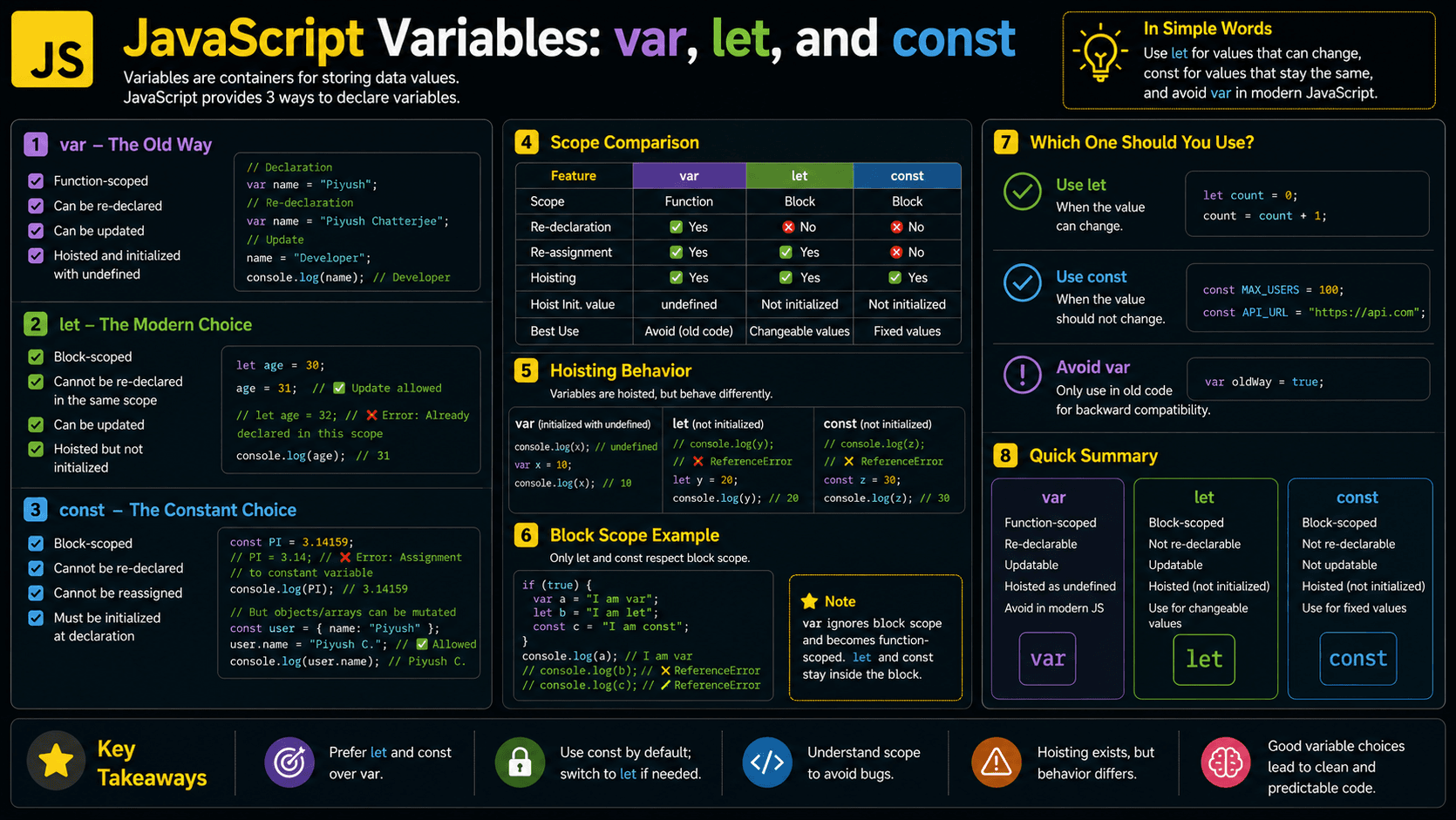
How does a website remember your name, your shopping cart total, or your current score? It stores those values in JavaScript variables. A variable gives a piece of data a meaningful name, lets that data change over time, and makes it available to the rest of your program.
Here you'll learn how variables work, when to reach for let, const, or var, and the common mistakes that trip up beginners.
What You'll Learn About JavaScript Variables
By the end, you'll know how to declare, assign, update, and safely use variables in modern JavaScript.
- Why programming languages need variables
- How
let,const, andvardiffer - How scope, hoisting, and the temporal dead zone work
- How JavaScript stores and finds variable values
- Common variable mistakes and practical best practices
Helpful Foundations Before You Begin
Variables are beginner-friendly, but understanding values and operators will make the examples easier to follow.
Helpful foundations:
You can also check your foundation with the JavaScript Data Types Quiz.
Why Do Variables Exist in JavaScript?
Programs need to remember and reuse information. Without variables, you'd have to write out literal values such as names, prices, and scores everywhere they were needed. Change one of them and you'd be hunting down every copy by hand, which makes programs hard to maintain and easy to break.
Early programming languages solved this with named storage locations, so instructions could work with data that changes. JavaScript uses the same idea for web applications. A single variable might hold text typed into a form, a server response, a calculated total, or an HTML element.
Variables also make code readable. finalPrice tells you far more than 49.99 scattered through your program. Name a value once, and you can reuse it, update it when the rules allow, and make it clear what the data actually represents.
A Mental Model for JavaScript Variables
Picture a JavaScript variable as a labeled storage box your program can open later to find a value.
Imagine a room filled with labeled boxes. One box is labeled userName, another is labeled score, and a third is labeled isLoggedIn.
The labels are variable names. The contents are values. When the program needs the score, it looks for the box labeled score and reads what is inside. If the score changes, the program replaces the contents while keeping the same label.
Some boxes can be updated; others are meant to keep whatever you first put in them. A let box can receive a new value. A const label can't be pointed at a different value once its first assignment is made.
Scope decides which rooms can reach each box. A variable created inside one room may be invisible from another.
Under the hood, JavaScript stores bindings between identifiers and values inside environments it creates as code runs. The labeled-box model isn't a literal description of memory, but it's a handy way to reason about variables.
A Real-Life Analogy for Variables
A variable is a lot like a contact saved in your phone. The contact name is the variable name; the phone number is its current value.
You can update the number without touching the contact name. And if a contact is meant to represent the same person, you don't replace it with some unrelated number. Clear variable names work the same way: they tell you what kind of information belongs inside.
What Are JavaScript Variables?
JavaScript variables are named bindings used to store and access values while a program runs. You declare them with let, const, or var. A variable can reference strings, numbers, objects, functions, and any other data type. Depending on how you declare it, its value may be updatable and its visibility may be block-scoped or function-scoped.
Here is a simple example:
const userName = "Maya";
let quizScore = 8;

quizScore = 9;

console.log(userName); // Maya
console.log(quizScore); // 9
userName can't be reassigned because it's declared with const. quizScore can change because it's declared with let.
How to Recognize Variables in Real Code
Variables turn up wherever code needs to name, hold onto, calculate, or pass a value.
Look for declarations that start with:
constfor bindings that will not be reassignedletfor bindings that may be reassignedvarin older JavaScript code- Function parameters such as
function greet(userName) - Destructuring patterns such as
const { id, email } = user - Imports such as
import { useState } from "react"
In production apps, variables commonly hold API responses, form values, configuration settings, DOM elements, React state references, counters, calculated prices, and function results. Names like isLoading, currentUser, totalPrice, and submitButton are strong signals that a variable represents application state or reusable data.
How Do Variables Work in JavaScript?
A variable works by connecting an identifier, such as totalPrice, to a value in the current scope. JavaScript creates the binding when it processes the declaration, assigns a value when the statement runs, and resolves later references by walking the scope chain. Reassignment swaps the binding's value, as long as the declaration allows it.
Declare the variable
Use const, let, or var to introduce a name into a scope.
Initialize its value
Assign the first value, such as const price = 20. A const declaration must be initialized immediately.
Read the binding
Refer to the variable name whenever the program needs its current value.
Reassign when permitted
A variable declared with let or var can point to another value. A const binding cannot be reassigned.
Release unreachable data
JavaScript's garbage collector may reclaim associated memory after a value can no longer be reached.
Think Like the JavaScript Engine
The JavaScript engine creates environments, records variable bindings in them, and searches those environments whenever your code refers to a variable.
Take this example:
const taxRate = 0.2;

function calculateTotal(price) {
  const tax = price * taxRate;
  return price + tax;
}

console.log(calculateTotal(50)); // 60
Behind the scenes, the flow looks roughly like this:
- Create the global execution context. The engine prepares an environment for top-level declarations such as
taxRateandcalculateTotal. - Execute the script.
taxRatereceives0.2, and the function declaration becomes available. - Push the function call onto the call stack. Calling
calculateTotal(50)creates a new function execution context. - Create a local lexical environment. The parameter
pricereceives50, and the local variabletaxreceives10. - Search the scope chain. The function cannot find
taxRatelocally, so it checks the outer environment and finds it globally. - Return the result. The function returns
60, and its execution context leaves the call stack. - Handle memory later. Values that are no longer reachable become eligible for garbage collection.
JavaScript specifications describe bindings and environments rather than requiring engines to use literal boxes in memory. Engines such as V8 may optimize storage internally without changing observable behavior.
Variable Declarations, Initialization, and Reassignment
Declaring, initializing, and reassigning a variable are related but separate steps.
let courseName;                // Declaration
courseName = "JavaScript";     // Initialization by assignment
courseName = "TypeScript";     // Reassignment

console.log(courseName); // TypeScript- Declaration introduces a variable name.
- Initialization provides its first value.
- Assignment places a value into an existing binding.
- Reassignment replaces the binding's current value.
A const declaration folds declaration and initialization into one step, since it has to receive a value right away:
const platformName = "Code Academy";Comparing var, let, and const
The main differences between var, let, and const come down to scope, redeclaration, reassignment, and initialization behavior.
| Feature | var | let | const |
|---|---|---|---|
| Scope | Function or global | Block | Block |
| Can be reassigned? | Yes | Yes | No |
| Can be redeclared in the same scope? | Yes | No | No |
| Available before declaration? | Reads as undefined | Temporal dead zone | Temporal dead zone |
| Must be initialized immediately? | No | No | Yes |
| Recommended in modern code? | Rarely | When reassignment is needed | By default |
const maximumAttempts = 3;
console.log(maximumAttempts); // 3
Use const when the binding will not be reassigned.
Rule of thumb: Start with const. Change it to let only when the variable must be reassigned. Use var mainly when maintaining older code.
JavaScript Variable Scope Explained
Now that you know which keyword to reach for, the next question is where a variable can be seen. That's scope: it determines where a binding can be accessed. Modern JavaScript mainly uses global, function, and block scope.
const applicationName = "Quiz App"; // Global or module scope

function displayScore() {
  const score = 10; // Function scope

  if (score > 5) {
    const message = "Great job!"; // Block scope
    console.log(message);
  }

  console.log(score);
}

displayScore();
// Great job!
// 10
The message variable exists only inside the if block. Try to use it outside, and you'll get a ReferenceError.
That's because let and const are block-scoped. var ignores ordinary block boundaries and is scoped to its containing function or script instead.
Practical JavaScript Variable Examples
Variables earn their keep when they stand for real application data, not isolated demo values. Here are a few patterns you'll see all the time.
Calculating a Shopping Cart Total
const itemPrice = 25;
let quantity = 3;
const discountRate = 0.1;

const subtotal = itemPrice * quantity;
const discount = subtotal * discountRate;
const finalTotal = subtotal - discount;

console.log(finalTotal); // 67.5
The names make the calculation easier to read and update.
Tracking a Quiz Score
const answers = [true, false, true, true];
let correctAnswers = 0;

for (const isCorrect of answers) {
  if (isCorrect) {
    correctAnswers += 1;
  }
}

const percentage = (correctAnswers / answers.length) * 100;

console.log(correctAnswers); // 3
console.log(percentage); // 75
correctAnswers uses let because it changes as the loop runs. answers and percentage are never reassigned, so they stay const.
Destructuring API Data
const user = {
  id: 42,
  profile: {
    displayName: "Amina",
    role: "student"
  }
};

const {
  id,
  profile: { displayName, role }
} = user;

console.log(id);          // 42
console.log(displayName); // Amina
console.log(role);        // student
Destructuring pulls variables straight out of selected object properties. You'll see it constantly in React components, API handlers, and configuration code.
Common Mistakes with JavaScript Variables
Most variable bugs trace back to a handful of causes: scope, reassignment, hoisting, naming, or a misunderstanding of what const actually protects. Here's how to spot each one.
Using a Variable Before Its Declaration
Common mistake: let and const bindings exist from the start of their block, but they cannot be accessed before the declaration executes. This period is called the temporal dead zone.
❌ Wrong
console.log(quizTitle); // ReferenceError
const quizTitle = "JavaScript Variables";
✅ Correct
const quizTitle = "JavaScript Variables";
console.log(quizTitle); // JavaScript Variables
Expecting const to Make an Object Immutable
const prevents reassignment of the binding. It does not freeze the contents of an object or array.
const settings = {
  theme: "light"
};

settings.theme = "dark"; // Allowed
console.log(settings.theme); // dark
Reassigning the entire object is not allowed:
const settings = { theme: "light" };

// settings = { theme: "dark" };
// TypeError: Assignment to constant variable
Use Object.freeze() when shallow runtime protection is appropriate:
const settings = Object.freeze({
  theme: "light"
});

// In strict mode, assigning settings.theme may throw a TypeError.
Accidentally Relying on var Block Scope
❌ Wrong
if (true) {
  var statusMessage = "Completed";
}

console.log(statusMessage); // Completed
The code runs, but statusMessage leaks out of the block, which is rarely what you want.
✅ Correct
if (true) {
  const statusMessage = "Completed";
  console.log(statusMessage); // Completed
}

// console.log(statusMessage); // ReferenceError
Creating an Accidental Global Variable
Assigning to an undeclared name may create a global property in some non-strict script environments. In strict mode and JavaScript modules, it throws a ReferenceError.
❌ Wrong
"use strict";

// totalScore = 10; // ReferenceError
✅ Correct
"use strict";

const totalScore = 10;
console.log(totalScore); // 10
Best Practices for Declaring Variables
A few habits make your declarations safer, clearer, and easier to change later.
- Prefer
constunless reassignment is required. - Use
letfor counters, changing state, and values assigned conditionally. - Avoid
varin new code. - Declare variables close to where they are used.
- Use descriptive camelCase names such as
currentUserorremainingAttempts. - Avoid unclear names such as
x,data1, ortempunless the context is tiny and obvious. - Keep each variable focused on one meaning.
- Do not reuse one variable for unrelated types of data.
Name booleans like questions: isLoading, hasPermission, and canSubmit immediately communicate that their values should be true or false.
Do not add const to every value in an expression. Create a variable when a name improves understanding, avoids repetition, or preserves a result for later use.
Real-World Uses of JavaScript Variables
Variables show up in every corner of a JavaScript application, standing in for values the program needs to reach.
A few examples you'll meet in production:
- Forms: email addresses, validation messages, and submission status
- E-commerce: product prices, quantities, discounts, and cart totals
- Authentication: the current user, access tokens, and permissions
- React applications: props, state references, derived values, and event data
- Node.js servers: request parameters, database results, and configuration
- DOM scripts: selected elements, input values, and event handler data
- Games and quizzes: scores, timers, current questions, and remaining attempts
A well-named variable does double duty: it documents your program while giving the code access to the value underneath.
JavaScript Variables Interview Questions
These questions test the kind of practical knowledge interviewers probe for: declarations, scope, and how values behave.
Frequently Asked Questions About JavaScript Variables
Here are the questions beginners ask most often about JavaScript variable syntax and behavior.
Related JavaScript Learning Resources
These guides build on variables by digging into the values they hold and the rules that control where they can be reached.
Understand strings, numbers, booleans, objects, and other values stored in variables.
🔑 Key Takeaways
JavaScript variables tie meaningful names to values your program needs to read, reuse, or update.
- Use
constwhen a binding will not be reassigned. - Use
letwhen reassignment is required. - Avoid
varin modern code unless maintaining older software. - Remember that
constdoes not make objects immutable. - Keep variables in the narrowest practical scope.
- Choose names that clearly describe the stored value.
Test Your JavaScript Variables Knowledge
A quiz is the fastest way to find out whether variable declarations, scope rules, hoisting, and naming best practices really stuck, without leaning on your notes.